
Posts

How to Safeguard Your MetaMask Wallet

Image
Introduction Recently, I read some posts on a few Facebook groups, asking people to give their wallet addresses to get free promotions. I've my reservations, especially given the fact that I've been monitored by some extremely evil men for many years, so all the more I've to be on guard. As such, I decided to research on the topic of safeguarding one's metamask wallet.     Never Let Anyone Know Your Secret Recovery Phrase You'll be given a secret phrase or seed phrase by MetaMask upon signing up. It's used to recover your wallet. Therefore, you should never let anyone know the phrase, even if they claim to be from MetaMask.   Just imagine someone has access to your ATM pin. And with the pin, they could withdraw money from your bank account if they choose to. You won't feel good about it, right? Even if you only give your ATM pin to a family member whom you could trust, does it mean that they will NEVER give your pin to someone else? Remember your secret rec...
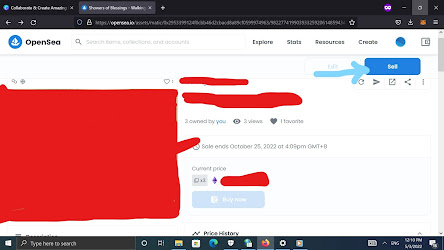
How to Sell Your NFTs on OpenSea?

Image
During the last post, I showed you how to create NFTs on OpenSea.  In this post, I'll show you how to sell NFTs on OpenSea and navigate the process of listing your digital assets.   Step-by-Step Guide  1st Step  Look for the NFT that you want to sell. Then click on "Sell" as shown below:     2nd Step State the quantity. 3rd Step State the price. 4th Step Indicate the duration by clicking on the calendar icon as shown below. Note that the maximum duration is 6 months. 5th Step Next, click on "Complete listing".  6th Step After completing your listing, make sure you sign the transaction by clicking on "Sign".   7th Step Once you've clicked on "Sign" as shown above, you'll be asked to sign. Just click on "Sign" as shown below. Note that you've to scroll down until the "Sign" button turns to blue. Otherwise, you won't be able to sign. Once you've done that, you'll be directed to the page shown below: ...

Creating NFTs on OpenSea Polygon Blockchain: Step-by-Step Guide

Image
Introduction Interested in creating your own NFTs but unsure where to start? This step-by-step guide will walk you through setting up MetaMask, connecting it to OpenSea and creating your first NFT collection on the Polygon blockchain.  Whether you're new to crypto or looking to explore NFTs, these easy-to-follow instructions will get you ready to launch your digital assets with confidence. Installation of MetaMask First off, you've to install the MetaMask as an extension on one of the following web browsers: 1. Google Chrome 2. FireFox 3. Brave Here's how to do it: 1st Step Click on the 3 lines as shown in the image below: 2nd Step Select "Add-ons and Themes" in the drop-down menu as shown below: 3rd Step In the search bar as shown below, search for the cryptocurrency (crypto) wallet you want. You can choose any wallet.  4th Step Once you've your MetaMask extension or any other extension, you'll have to create an account for the wallet of your choice. For ...